Most online M3U editors stop at “download the file.” m3ueditor also publishes protected links for TiviMate, IPTV Smarters, VLC, and Kodi. Watch now is the other path: play that same curated playlist in the browser, on whatever screen you have with you.
It is included on every plan. m3ueditor does not sell IPTV subscriptions, streams, or channel packages — you bring your own source. Watch now only plays what you already imported and kept.
A player that behaves like a native app
On a laptop or in landscape, Watch now is three panes: groups on the left, channels in the middle, video and programme guide on the right. That is the same mental model as TiviMate-style apps, so you are not hunting for a hamburger menu to change channel.
On a phone in portrait, the layout reflows instead of shrinking into a cramped desktop page. The player stays on top. Groups and channels sit underneath so one thumb can still pick a station. Rotate the phone and you are back to the three-pane layout. Fullscreen uses the phone’s native video fullscreen (including iPhone Chrome and Safari).
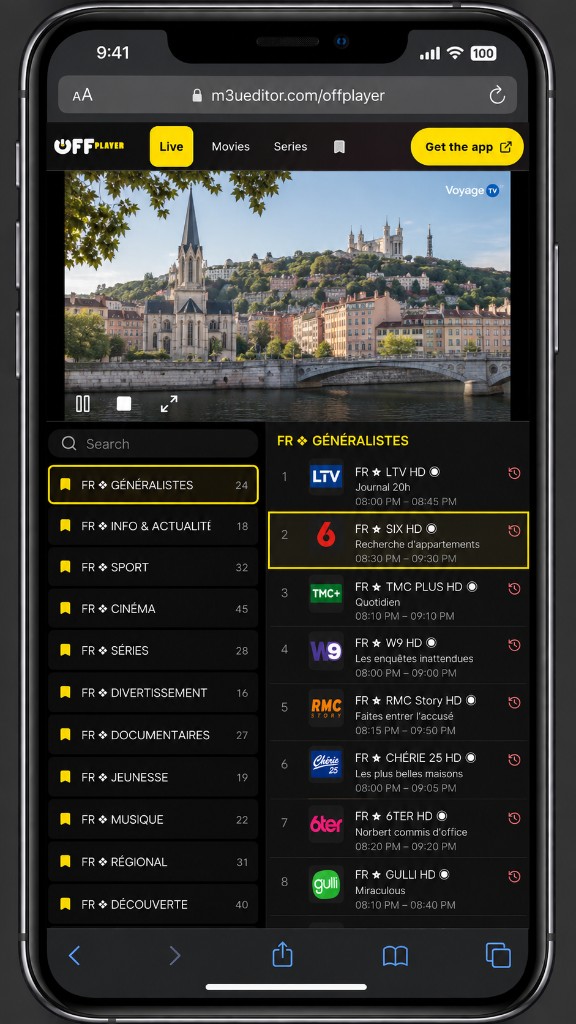
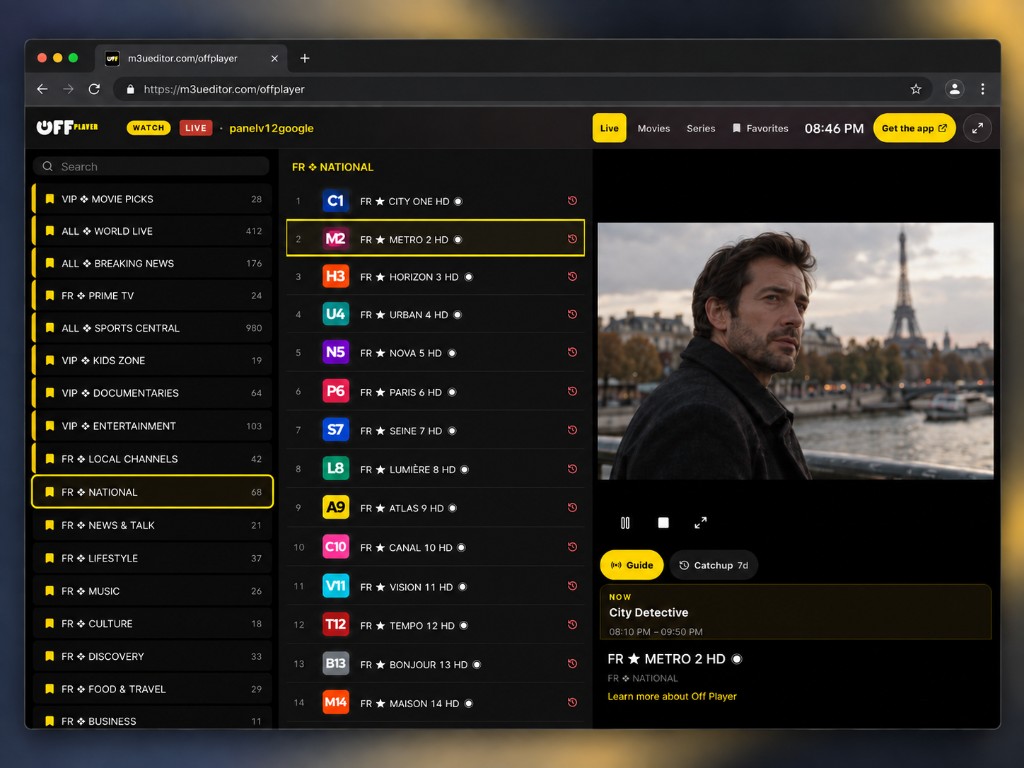
Bookmark the Watch now page. It is a public URL for that playlist — treat it like a secret. Do not post it in a group chat. Anyone with the link can watch unless you add a PIN.
How to open Watch now
- Import and curate. Bring in an M3U URL, file, or Xtream portal, pick groups, fix EPG matches, and save. Huge provider dumps are fine — the editor is built for them.
- Click Watch now. From the playlist page or from Distribute, open Watch now. It launches in a new tab as a full-screen player shell — no dashboard chrome in the way.
- Watch on the device in your hand. Live TV, movies, and series from your lineup. Favorites stay in the top bar. Off Player users can keep starring groups in the editor.
- Optional PIN. Set a 4–8 digit PIN on the public Watch now link. Visitors see a lock screen until they enter it.
Programme guide and catchup
If your channels have EPG, Watch now shows a scrollable guide next to the player — now and next, plus longer descriptions you can actually read. When your provider advertises archive / catchup on a live channel, you can jump back to a programme from the Catchup tab. Playback happens in the browser; m3ueditor does not transcode Watch now video on the server.
When to use Watch now vs a TV app
Use Watch now when you are away from the set-top box: a quick channel on your phone, checking a match on a laptop, or previewing the lineup you just edited. Use Distribute when the living-room player should keep running on TiviMate or IPTV Smarters with your protected M3U and XMLTV URLs. Both consume the same cleaned playlist. Viewing schedule still applies to published app URLs; Watch now is for you, in the browser.
What Watch now is not
- It is not a channel package or “IPTV subscription” from m3ueditor.
- It does not replace your provider. If a stream is down at the source, the player cannot invent it.
- Catchup appears only when the provider marks the channel as having archive — we do not invent timeshift.
Take your player with you.
Get started →FAQ
Does Watch now work on a phone?
Yes. Portrait puts the video on top with groups and channels below. Landscape matches the laptop three-pane player. It is a web app — Chrome, Safari, and other browsers on iOS and Android.
Do I need TiviMate or IPTV Smarters?
Not for Watch now. Those apps remain the right choice for a TV box. Watch now is the browser player that travels with you. You can use both from the same playlist.
Is Watch now on every plan?
Yes. After you import a playlist you can open Watch now. Paid plans still govern playlist size, EPG catalogue, and publishing — not whether the web player exists.
Can I PIN-lock the public link?
Yes. Choose a 4–8 digit PIN in the Watch now settings for that playlist. Share the URL only with people who should have the code.
Does m3ueditor sell the streams I watch?
No. We are a playlist editor. You bring the source. See our Terms of Service.
More on the editor: import and distribute to a player app · how m3ueditor compares on playlist size, EPG, and AI · Watch now on the homepage.