EPG means Electronic Programme Guide. In an M3U and XMLTV setup, the playlist contains the playable
channel while the XMLTV document contains programme times, titles, descriptions, and related metadata.
The tvg-id is the key that connects them.
Before matching channels, decide whether to use the M3UEditor guide library or an external XMLTV URL from a source you are authorized to use. Do not combine identifiers from one guide with programme data from another and expect them to match automatically.
1. Choose the EPG mode
Open the playlist EPG settings and choose one of the available modes:
- None: no guide is generated for the playlist.
- External XMLTV URL: use one HTTP or HTTPS guide URL and match channels to identifiers in that file.
- M3UEditor EPG: match against the platform library when your plan includes that feature.
If you use an external source, open the URL in a browser or XML tool first. Confirm that it returns XML, contains recent programme data, and uses stable channel IDs.
2. Understand tvg-id matching
A channel title such as “News HD” is only a display label. The guide match normally depends on a value
such as tvg-id="news.example". That value must equal the id of a
<channel> element in the XMLTV file.
Similar channel names can represent different regions, time shifts, resolutions, or language feeds. Match the exact service you intend to show, not simply the first result with a familiar name.
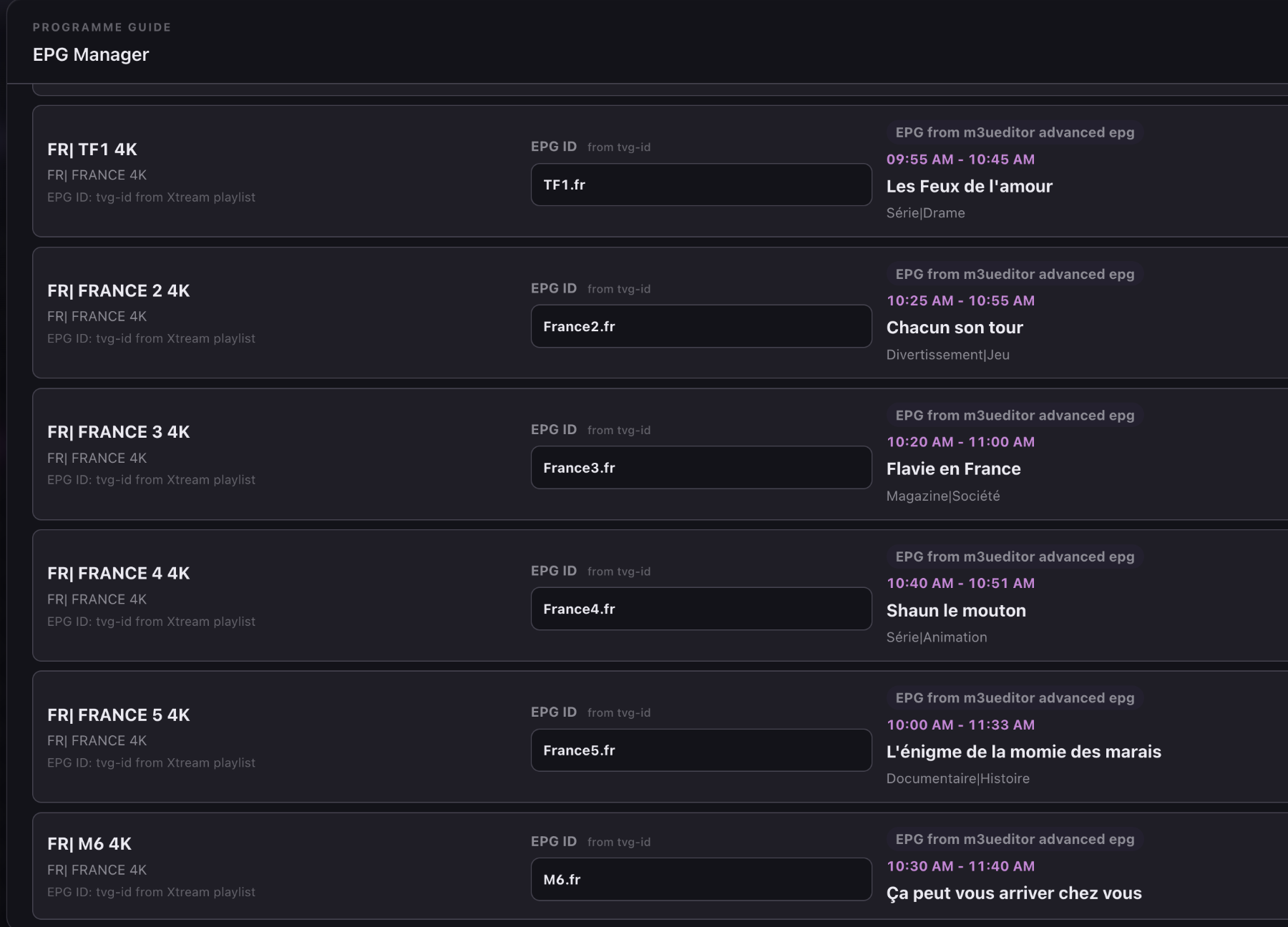
3. Run EPG auto matching
Open EPG Manager and run auto matching on a small group first. Review suggested matches before applying them widely. Clean channel names and existing IDs improve the result, but automatic matching still needs human review for regional or similarly named services.
- Start with one country or channel group.
- Review channels with no match and channels with multiple plausible matches.
- Spot-check the current and next programmes after saving.
4. Fix missing or wrong EPG manually
Search the guide library by broadcaster name, region, or known ID. Select the correct result and save it to the playlist channel. If a guide is shifted but otherwise correct, use the EPG time offset rather than assigning a different broadcaster.
When a channel still has no guide, check this sequence:
- The playlist EPG mode is not set to None.
- The channel has a non-empty
tvg-id. - The exact ID exists in the selected guide source.
- The XMLTV source contains current programme entries for that ID.
- The player has refreshed both the playlist and its guide cache.
5. Publish and add the XMLTV URL to your player
Open Export or Distribute after the matches are saved. Copy the M3U URL and the XMLTV or
xmltv.php URL associated with the same playlist. Some players read the guide URL from the
M3U header; others require it in a separate EPG settings field.
Keep both distribution endpoints enabled. If you rotate export credentials, update both URLs in the player. A valid playlist with an old XMLTV credential can produce channels with an empty guide.
Use country coverage to narrow a match
The public EPG channel library lets you browse guide IDs by country. The dedicated guides for the United States, United Kingdom, France, Spain, and Germany explain common regional matching details.
Country filters reduce false matches, but the final check is still the programme schedule. Verify at least the current programme, the next programme, and the local time alignment.
Validate a match before applying it widely
Use a small verification sample before matching an entire playlist. Pick a national channel, a regional channel, a time-shifted service, and one channel with a similar name elsewhere. Confirm the current programme and the next programme for each result.
If those examples are accurate, continue group by group. If several are wrong, stop and review the guide source, country filter, and existing identifiers. A bad source or wrong country selection will produce repeated false matches that become harder to notice after a bulk assignment.
Add EPG to your IPTV playlist. Match guide IDs, review the schedule, and publish an XMLTV URL for your player.
Get Started FreeCommon questions
Why does the channel name look right but the EPG stay empty?
The display name is not the mapping key. Check that the channel tvg-id exactly matches an ID in the selected XMLTV source and that the source contains current programmes.
Why is the guide showing the wrong regional channel?
The assigned ID probably points to another regional or time-shifted service. Search by country and region, assign the correct ID, then refresh the guide in the player.